
- Turn off and unplug the device and let it cool.
- Dry-dust first with a clean microfiber cloth, wiping gently in one direction.
- Use a soft brush for vents, ports and buttons.
- Vacuum vents with a small brush nozzle to pull dust out instead of pushing it in.
- For screens, use a dry microfiber cloth, then one barely dampened with water if needed. Never spray liquid directly on electronics.
- Dust weekly and clean vents monthly to prevent overheating.
Electronics are dust magnets. TVs, computers, game consoles, routers and speakers build up static that attracts dust, and many have fans that pull dust inside. A layer of dust looks bad, but it can also clog vents, trap heat and make fans work harder and louder. Over time, heat can shorten a device's life. Dusting electronics is easy, but the wrong tools, like wet cloths, household sprays or paper towels, can scratch screens or cause damage. This guide explains how to dust TVs, monitors, computers, laptops, consoles, routers and cables safely, which tools to use, how often to clean and how to keep dust down around your devices.
In this guide:
- why electronics attract dust
- the right tools
- TVs and monitors
- computers, laptops and consoles
- routers, speakers and cables
- how often to dust
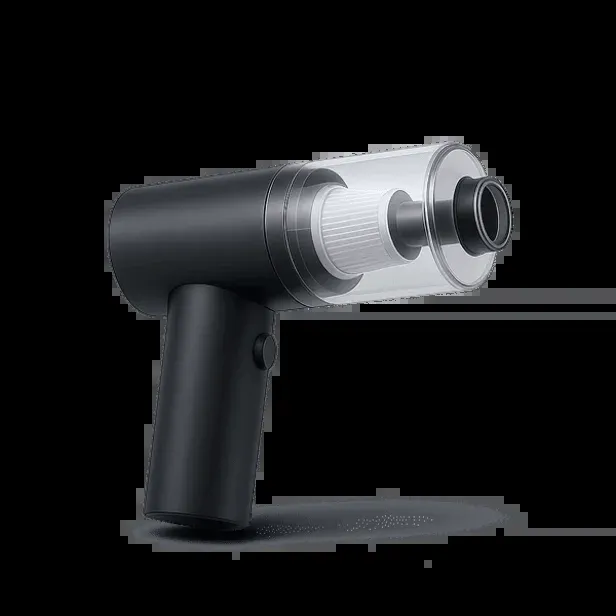
Our pick: the DustaClean Handheld Vacuum
Cordless, USB-rechargeable mini vacuum under 1 lb with HEPA filtration, 2 nozzles and up to 30 minutes per charge.
Check today's price →$69.99, or from $49.99 each in bundles
Why do electronics attract so much dust?
- Static electricity on screens and plastic housings pulls dust in.
- Fans in computers and consoles suck air, and dust, through vents.
- Heat rising from devices carries dust particles that settle on top.
- Location: devices near the floor or behind furniture collect more.
- Pets: hair and dander end up in vents.
For the bigger picture, see why your house is so dusty.
Which tools are safe for electronics?
| Tool | Use | Avoid |
|---|---|---|
| Microfiber cloth | Screens, housings, remotes | Dirty cloths that scratch |
| Soft brush (makeup or paint brush) | Vents, ports, buttons, keyboards | Stiff bristles |
| Handheld vacuum with brush nozzle | Vents, behind TV, cables | Touching circuit boards |
| Compressed air | Short bursts into vents and keyboards | Holding the can upside down; spinning fans |
| Slightly damp cloth (water) | Fingerprints on housings | Dripping cloths, sprays |
| Screen cleaner | Only products made for screens | Ammonia, alcohol on some screens, glass cleaner |
How do you dust a TV or monitor?
- turn it off and let the screen cool; dust is easier to see on a dark screen
- wipe gently with a dry microfiber cloth, in one direction, without pressing
- for smudges, lightly dampen a corner of the cloth with water, wipe, then dry
- dust the frame, stand and back panel with the cloth
- vacuum the vents on the back with a brush nozzle
- clean the area behind the TV and the cables
Always check your TV manual; some screens have coatings that react to certain cleaners.
Our pick: the DustaClean Handheld Vacuum
Cordless, USB-rechargeable mini vacuum under 1 lb with HEPA filtration, 2 nozzles and up to 30 minutes per charge.
Check today's price →$69.99, or from $49.99 each in bundles
How do you dust a computer or laptop?
- Desktop: shut down and unplug. Dust the case with a microfiber cloth. Vacuum the outside of vents. For inside cleaning, use short bursts of compressed air while holding fans still, or follow the manufacturer's guide.
- Laptop: shut down and unplug. Wipe the lid and palm rest. Use a soft brush or short bursts of air for vents and the keyboard.
- Monitor: same as a TV.
For keyboards, see how to clean a keyboard.
How do you dust a game console?
Consoles have powerful fans that draw in dust. Unplug the console, then dust the outside with a microfiber cloth and vacuum the vents with a brush nozzle. Don't block the vents and don't keep the console inside a closed cabinet. Place it on a shelf rather than on carpet, where it pulls in fibers. Clean vents monthly if you play often or have pets.
What about routers, speakers and smart devices?
- Routers and modems: dust the top and vents; heat buildup can affect performance.
- Speakers: use a soft brush or a lint roller on fabric grilles; vacuum gently on low.
- Smart speakers and displays: dry microfiber cloth only.
- Remotes and controllers: wipe with a lightly damp cloth, then dry.
- Chargers and power strips: unplug and dust; dust buildup around plugs is a fire concern.
How do you deal with dusty cables?
Tangled cables behind the TV and desk collect dust bunnies. Unplug, wipe cables with a dry cloth, vacuum the floor and wall behind them and bundle cables with ties or a cable sleeve so there's less surface for dust to grip. Keeping cables off the floor helps a lot.
What should you avoid?
- spraying any liquid directly on a device
- paper towels and tissues, which can scratch and leave lint
- household cleaners with ammonia, bleach or abrasives
- cleaning devices while they're on
- vacuuming circuit boards directly
- letting fans spin freely with compressed air
How often should you dust electronics?
| Device | How often |
|---|---|
| TV and monitor screens | Weekly |
| Vents on consoles and computers | Monthly |
| Inside a desktop computer | Every 6 to 12 months |
| Routers, speakers, chargers | Monthly |
| Behind the TV and desk | Every few weeks |
Add electronics to your weekly cleaning schedule.
How do you keep dust down around electronics?
- vacuum floors and rugs regularly with good filtration
- keep humidity moderate; very dry air increases static
- change your HVAC filter on schedule
- keep pets off desks and media consoles
- use an air purifier in dusty rooms
The EPA explains what a HEPA filter is and how it captures fine particles. More in how to reduce dust in the house and dust allergy cleaning tips.
Where does DustaClean fit in?
A handheld vacuum is one of the easiest tools for electronics: it lifts dust out of vents, from behind the TV and along cables, instead of blowing it into the room. DustaClean weighs under 1 lb, has HEPA filtration, two nozzles and runs about 30 minutes per charge. It's $69.99, or from $49.99 each in bundles. Read our DustaClean review and the best handheld vacuum.
How do you reduce static on screens?
Static is the main reason TV and monitor screens attract dust right after you clean them. A few things help: wipe with a clean, dry microfiber cloth rather than paper or cotton, which can build up static; keep indoor humidity in a moderate range in winter; and avoid placing devices right next to heating vents, which dry the air and blow dust toward them. The American College of Allergy, Asthma and Immunology explains how dust allergies work and recommends keeping humidity in check, which also helps with static.
How do you clean phones and tablets?
- turn the device off and remove the case
- wipe the screen with a dry microfiber cloth
- for smudges, use a cloth lightly dampened with water
- clean ports with a soft, dry brush or a wooden toothpick, gently
- wash the case separately with soap and water and let it dry fully
- follow the manufacturer's guidance if you want to disinfect
How do you keep a home office dust-free?
A home office has computers, printers, paper and often a rug under the chair, all of which produce or collect dust. Dust the desk and monitor weekly, vacuum the floor and chair mat, keep paper stacks in closed boxes and empty the shredder bin often. Printers create paper dust, so vacuum around them. A small air purifier with a HEPA filter near the desk can help if you're sensitive to dust. More ideas in how to get rid of dust mites.
Why does my computer fan get loud?
A fan that suddenly sounds louder is often clogged with dust, so it spins faster to keep the device cool. Clean the vents first. If it stays loud after cleaning, or the device gets very hot or shuts down, the fan or thermal paste may need professional service. Keeping vents clear and the device on a hard, open surface helps it breathe.
What about kitchen electronics?
Microwaves, coffee makers, toasters and smart displays in the kitchen collect a mix of dust and grease, which is stickier than ordinary dust. Unplug them, wipe the outside with a cloth dampened with warm water and a drop of dish soap, then wipe with plain water and dry. Clean vents with a soft brush. Keep crumbs out of toaster slots by emptying the crumb tray, and never put water into a device that isn't designed for it.
How do you clean gaming controllers and headsets?
Controllers and headsets collect skin oils and dust in seams and buttons. Wipe controllers with a cloth barely dampened with water, use a soft brush around buttons and triggers, and dry them. For headsets, wipe the band and remove ear pads if possible to wipe or replace them. A monthly clean keeps them looking and feeling fresh.
How do you dust printers and lamps?
Printers make paper dust, and the inside collects lint. Unplug the printer, open the covers and use a soft brush or a handheld vacuum on low around the paper path, without touching rollers or the print head. Wipe the outside with a dry cloth. Lamps and light fixtures near your devices collect dust that falls back onto screens, so dust lampshades with a lint roller and bulbs (when cool) with a dry cloth.
The bottom line
To dust electronics:
- turn off and unplug devices first
- use a dry microfiber cloth and a soft brush
- vacuum vents with a brush nozzle; use compressed air in short bursts
- never spray liquid on devices or use household cleaners
- dust screens weekly and vents monthly
DustaClean is a handheld vacuum under 1 lb with HEPA filtration and two nozzles, $69.99 or from $49.99 each in bundles.
Our pick: the DustaClean Handheld Vacuum
Cordless, USB-rechargeable mini vacuum under 1 lb with HEPA filtration, 2 nozzles and up to 30 minutes per charge.
Check today's price →$69.99, or from $49.99 each in bundles
Frequently asked questions
What is the best way to dust electronics?
Unplug the device, wipe with a dry microfiber cloth, use a soft brush on vents and ports and vacuum vents with a brush nozzle.
Can I use a wet cloth on electronics?
Only a cloth barely dampened with water, after unplugging. Never spray liquid directly on a device.
Can I vacuum my computer?
Vacuum the outside vents with a brush nozzle. Don't vacuum circuit boards directly.
Is compressed air safe for electronics?
Yes, in short bursts with the can upright. Hold fans still so they don't overspin.
How often should I dust my TV?
Dust the screen weekly and vacuum the back vents monthly.
Why does my TV get so dusty?
Static electricity on the screen and heat rising from the TV pull dust toward it.

Michelle Hert
Michelle looks into the cleaning products that go viral in ads, from toilet foams to mini vacuums and drain cleaners. She reads the product pages, checkout and return policies, trusted safety sources and buyer feedback so you know what a product really does before you buy it. Her reviews are built on manufacturer information, official checkout and return policies, trusted safety sources and buyer feedback, and are updated when offers change. More about Michelle.