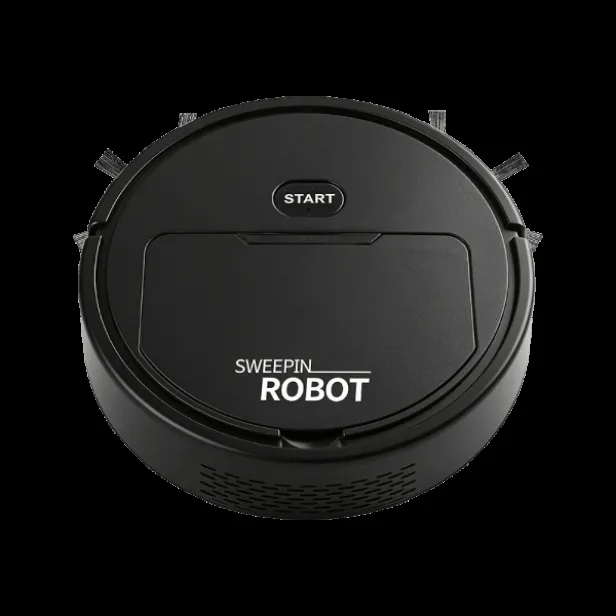
- DustaPro:
- a compact, one-button robot for daily maintenance: light dust, crumbs and hair on hard floors and low rugs
- no app, no Wi-Fi, no setup
- $69.99, or from $49.99 each in bundles
- Roomba:
- a range of robots with app control, scheduling and, on many models, room mapping, stronger suction and self-emptying docks
- better for large homes and carpet
- prices from a few hundred dollars to over $1,000
Roomba is the name most people think of when they hear "robot vacuum". iRobot made the category famous, and its robots range from basic models to advanced machines that map your home and empty themselves. Meanwhile, compact one-button robots like the DustaPro have become popular because they cost a fraction of the price and skip the apps and setup.
So which one is right for you? This comparison covers:
- what each robot is designed for
- features, suction and navigation
- maintenance and price
- which homes suit which robot
Our pick: the DustaPro Robot Vacuum
One-button robot vacuum: no app, no WiFi. 2.8 in tall to fit under furniture, quiet (60 dB or less), USB charging.
Check today's price →$69.99, or from $49.99 each in bundles
What are DustaPro and Roomba?
DustaPro is a compact, budget-friendly robot vacuum designed for daily maintenance. You press one button and it cleans, picking up dust, crumbs, pet hair and everyday debris on hard floors and low-pile rugs. There's no app, no Wi-Fi and no mapping. Its small size lets it get into tight spaces and under low furniture.
Roomba is iRobot's line of robot vacuums. Depending on the model, features include app control, scheduling, voice assistant support, room mapping, keep-out zones, stronger multi-surface cleaning and self-emptying bases. It's a family of robots at very different prices, not a single product.
How do DustaPro and Roomba compare?
| DustaPro | Roomba (range) | |
|---|---|---|
| Best for | Daily tidy-ups in small homes | Whole-home cleaning, larger homes |
| Controls | One button | App, schedules, voice (model-dependent) |
| Setup | None | Wi-Fi and app setup |
| Navigation | Bump-and-go with sensors | From basic sensors to full room mapping |
| Suction | Light (about 450 Pa), for surface debris | Stronger on mid and high-end models |
| Carpet | Hard floors and low rugs | Better on carpet, especially premium models |
| Self-emptying | No | Available on some models |
| Size | Compact; fits tight spaces | Standard robot size |
| Price | $69.99; from $49.99 each in bundles | From a few hundred dollars to over $1,000 |
How much does suction matter?
Suction power is the biggest real difference. The DustaPro's lighter suction (about 450 Pa) is designed for what collects on floors every day: dust, crumbs, hair and light debris on hard floors and low rugs. That's exactly what most small homes need between deeper cleans. It isn't designed to deep-clean thick carpet. Mid-range and premium Roombas have stronger suction and brush systems that do more on carpet. If your home is mostly carpet, that matters. If it's mostly hard floors, it matters much less.
Does navigation matter in a small home?
Less than you'd think. Room mapping is most useful in large, multi-room homes, where you want the robot to clean specific rooms or avoid certain areas. In a studio, apartment or a couple of small rooms, a compact bump-and-go robot covers the floor well in a short run, and it can squeeze into tight spots a larger robot can't. See small robot vacuums for tight spaces and robot vacuums for studio apartments.
Is the no-app design a downside?
For many people, it's the main attraction. No account to create, no Wi-Fi password, no firmware updates and no app permissions. You press the button and it cleans. That makes the DustaPro a great choice for:
- older relatives
- renters
- dorm rooms
- anyone who's tired of smart-home setup
If you want schedules, voice control and cleaning while you're away, a Roomba's app features are a genuine plus.
How do the prices compare?
| DustaPro package | Price per robot |
|---|---|
| 1 robot | $69.99 |
| 2 robots | $59.99 each |
| 3 robots | $54.99 each |
| 4 robots | $49.99 each |
Roomba prices vary widely by model, from a few hundred dollars for entry models to over $1,000 for premium ones with self-emptying docks. For the price of one mid-range Roomba, you could put a DustaPro on every floor of the house, or in every bedroom. Returns for DustaPro are accepted within 30 days for unused items in their original packaging, and defective items are replaced or refunded.
A simple daily robot for small homes
DustaPro: one button, no app, daily dust, crumbs and hair on hard floors and low rugs. $69.99, or from $49.99 each in bundles.
Check today's price →$69.99, or from $49.99 each in bundles
Which homes suit each robot?
Choose DustaPro if:
- you live in an apartment, studio, dorm or small house
- your floors are mostly hard floors and low rugs
- you want daily tidying between weekly vacuuming
- you don't want apps or setup
- you're on a budget or want robots for several rooms
Choose a Roomba if:
- you have a large, multi-room home
- you have a lot of carpet
- you want scheduling, mapping and app control
- you want a self-emptying dock
- budget is less of a concern
Which is better for pet hair?
For daily pet hair on hard floors, the DustaPro does a good job. Running it every day during shedding season stops tumbleweeds from building up in corners and under furniture. For homes with heavy shedders and lots of carpet, a stronger robot or a full-size vacuum on the rugs once a week does the deep work. Empty the bin often and clear hair from the brush weekly with any robot. See robot vacuums for pet hair.
How does maintenance compare?
- Both: empty the bin, clean the filter, clear hair from the brushes and wipe the sensors.
- DustaPro: no app updates, no docking station to maintain, and it's light to carry between rooms.
- Roomba: app and firmware updates, and self-emptying models use dock bags that need replacing.
Full checklist in robot vacuum maintenance.
Should you pair a robot with a handheld vacuum?
Yes, whichever robot you choose. Robots handle floors. A handheld vacuum handles stairs, couches, car seats and spills. The DustaClean handheld (about 3,500 Pa) pairs well with the DustaPro for a complete, low-cost setup. See the best handheld vacuum.
What should you expect from a budget robot?
A budget robot like the DustaPro is a daily maintenance tool. It keeps floors looking clean every day so dust and crumbs don't build up, and that's where it shines. Plan a deeper vacuum on rugs and carpet about once a week. For many small homes, that combination is the sweet spot: very little effort, clean-looking floors and money left over. See are cheap robot vacuums worth it?
Which makes a better gift?
For students, renters, busy parents and older relatives, the DustaPro is easy to give and easy to use. There's nothing to set up, it works out of the box and it costs under $70. A Roomba makes a bigger-ticket gift for someone with a large home who loves smart-home gadgets.
How do you get the best results from either robot?
- Pick up socks, cords and small toys before a run.
- Tuck chairs under the table.
- Remove light bath mats that can tangle.
- Run it daily in kitchens, entryways and pet areas.
- Stay nearby for the first run to spot problem areas.
If a robot keeps getting stuck, see why a robot vacuum gets stuck.
Which is quieter?
Noise varies by model and mode. In general, compact low-suction robots like the DustaPro make a steady, moderate hum. High-powered robots, especially on carpet-boost settings, and self-emptying docks can be noticeably louder when they empty. In a small apartment, a quieter robot is easier to run while you're home. Either way, scheduling runs for when you're out or busy makes noise a non-issue.
Why do some people prefer a robot without an app?
Privacy and simplicity are the two big reasons. App-connected robots need an account and Wi-Fi, and mapping models create a floor plan of your home. Some people are happy with that; others prefer a robot that simply cleans without connecting to anything. A one-button robot also works the same way for every member of the household, including kids and grandparents. See robot vacuums without an app.
Do you still need a regular vacuum?
Yes, at least occasionally, with either robot. Robots excel at daily maintenance on open floor. A full-size or handheld vacuum handles stairs, edges, upholstery, car interiors and deep carpet cleaning. The best setup for most homes is a robot every day plus a quick deeper vacuum once a week. See robot vacuum vs regular vacuum.
Which is better for hardwood and tile?
On hard floors, the gap between the two narrows. Dust, crumbs and hair sit on the surface, and a compact robot picks them up well with daily runs. Daily cleaning also keeps grit from scratching wood finishes. See robot vacuums for hardwood floors.
Whichever you choose, running a robot daily is what keeps floors looking their best.
Can you start with DustaPro and upgrade later?
Yes, and many people do. A DustaPro is an inexpensive way to find out how much you like having a robot do the daily floor work. If you later move to a bigger, carpeted home, you can add a more advanced robot for the main floor and keep the DustaPro for a bedroom, office or the upstairs hallway.
Which is better for dust allergies?
Daily robot runs help any allergy sufferer, because dust is picked up before it builds up and gets kicked into the air. The American College of Allergy, Asthma and Immunology recommends regular cleaning to reduce dust allergens. Empty the bin outdoors or into a bag to avoid a dust cloud. For weekly deep cleaning, a vacuum with a sealed system and a HEPA filter traps the finest particles.
The bottom line
DustaPro and Roomba solve different problems. The DustaPro is a compact, one-button robot for daily dust, crumbs and hair on hard floors and low rugs, with no app or setup, from $49.99 each in bundles. It's ideal for small homes, apartments and dorms. Roombas offer app control, mapping, stronger suction and self-emptying docks at much higher prices, which makes them better suited to large, carpeted homes. If you want clean-looking floors every day for very little money and effort, the DustaPro is the smart pick.
Our pick: the DustaPro Robot Vacuum
One-button robot vacuum: no app, no WiFi. 2.8 in tall to fit under furniture, quiet (60 dB or less), USB charging.
Check today's price →$69.99, or from $49.99 each in bundles
Frequently asked questions
Is DustaPro better than Roomba?
For small homes and daily tidying on hard floors, DustaPro is simpler and far cheaper; Roombas suit larger, carpeted homes.
Does DustaPro have an app?
No. It's a one-button robot with no app or Wi-Fi.
How much does DustaPro cost compared with Roomba?
DustaPro is $69.99, or from $49.99 each in bundles; Roombas range from a few hundred dollars to over $1,000.
Can DustaPro clean carpet?
It's designed for hard floors and low rugs; thick carpet needs a stronger vacuum.
Is DustaPro good for pet hair?
Yes, for daily pet hair on hard floors and low rugs; empty the bin and clean the brush often.
Do I still need a regular vacuum with a robot?
Yes, for stairs, upholstery and a weekly deeper clean of rugs and carpet.

Michelle Hert
Michelle looks into the cleaning products that go viral in ads, from toilet foams to mini vacuums and drain cleaners. She reads the product pages, checkout and return policies, trusted safety sources and buyer feedback so you know what a product really does before you buy it. Her reviews are built on manufacturer information, official checkout and return policies, trusted safety sources and buyer feedback, and are updated when offers change. More about Michelle.