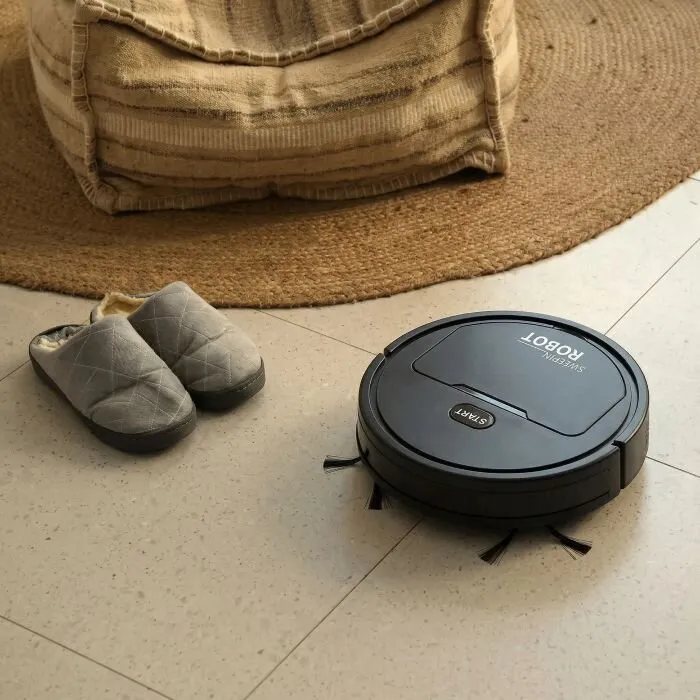
- Start with a single button, no account, no setup, no password.
- Don't collect data or map your home.
- Keep working if the WiFi goes down or the app is discontinued.
- Are usually cheaper and simpler to own.
Many robot vacuums today want you to download an app, create an account, connect to your home WiFi, accept a privacy policy and let the robot map every room before it cleans a single crumb. For some people that's part of the fun. For many others, it's a hassle they don't need, or a privacy question they'd rather not think about.
If you just want clean floors with as little fuss as possible, a robot vacuum without an app may be the better choice. This guide explains how app-free robots work, their pros and cons, who they suit best, and what to look for when you buy one.
How does a robot vacuum without an app work?
A non-app robot has its controls built into the device: usually a single start button, sometimes a second button to send it home or change the mode. You press start, and it cleans using its onboard sensors:
- Bump sensors tell it when it touches furniture or walls, so it changes direction.
- Cliff sensors stop it from falling down stairs.
- Side brushes sweep debris from edges toward the intake.
- A cleaning pattern (random bounce, spiral, or edge-following) covers the floor over the run.
It doesn't need a map because it simply covers the open floor until the battery runs low or the run ends. In compact homes and open rooms, that works very well.
Why choose a robot vacuum without an app?
| Reason | What it means for you |
|---|---|
| No setup | Out of the box, charge, press start |
| No WiFi or account | Nothing to connect, no passwords, no updates |
| Privacy | No home maps, no camera data, nothing sent to a server |
| Reliability | Works even if your internet is down or the app is retired |
| Easy for everyone | Kids, grandparents and guests can use it |
| Lower price | No mapping hardware or cloud service to pay for |
Are app-connected robot vacuums a privacy concern?
Connected robots can collect information such as floor maps, room names, cleaning times and, on models with cameras, images of your home. Reputable brands describe their data practices in their privacy policies, and many people are comfortable with that. But any connected device in your home adds something to think about: account security, data sharing and software updates. The University of Michigan's Safe Computing guide recommends securing your home WiFi, changing default passwords and keeping connected devices updated. A robot without WiFi simply takes that question off the table.
What do you give up without an app?
To be fair, app-free robots skip a few features:
- No scheduling from your phone (you start it when you leave the room or before you go out).
- No room-by-room maps or virtual no-go zones; you close doors or move items instead.
- No remote start while you're away.
- Less systematic coverage in very large or complex homes.
For apartments, single-level homes, and open-plan rooms, these trade-offs rarely matter. Pressing a button on your way out the door takes one second.
Is DustaPro a good robot vacuum without an app?
DustaPro is built around exactly this idea: a one-button robot vacuum with no app, no WiFi and no account. It's about 2.8 inches tall, so it fits under most beds and sofas, runs quietly (the brand lists 60 dB or less), and charges by USB, so there's no bulky docking station to find room for.
Its suction is modest, so we recommend it for what it does best: daily maintenance of dust, crumbs and pet hair on hard floors and low rugs. It's not a deep carpet cleaner. For apartments, bedrooms, kitchens and living rooms with hard floors, it keeps things tidy with almost zero effort. It costs $69.99, or as little as $49.99 each in bundles, with a 30-day refund guarantee. Read our DustaPro review, where we rate it 4.3/5.
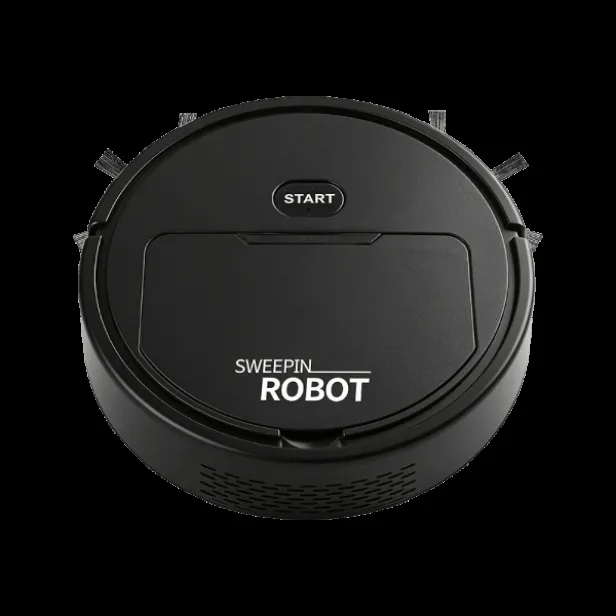
A robot vacuum with no app, no WiFi, no setup
DustaPro one-button robot vacuum: press start and it cleans. 2.8 in tall, quiet, USB charging. $69.99, or from $49.99 each in bundles, with a 30-day refund guarantee.
Check today's price →$69.99, or from $49.99 each in bundles
Who is a no-app robot vacuum best for?
- Older adults who don't want to deal with smartphones or accounts. A one-button robot is also a thoughtful gift for parents and grandparents.
- Renters and small apartments, where mapping adds little value. See robot vacuums for small apartments.
- Privacy-minded households that limit connected devices.
- Homes with weak WiFi, cabins, offices or garages.
- Second robots for a bedroom or a different floor.
- Anyone who wants simple: press start, empty the bin, done.
What should you look for in a robot vacuum without an app?
- Low height to clean under furniture.
- Simple, clearly labeled controls.
- Cliff and bump sensors that work reliably.
- Easy-to-empty bin and washable or replaceable filter.
- Convenient charging (USB or a compact dock).
- Quiet operation if you'll run it while home.
- A clear return policy from the seller.
How do you get the best results without an app?
- Clear the floor of cords, socks and small toys before a run.
- Close doors to keep it in the rooms you want cleaned.
- Run it daily in the same rooms; frequent short runs beat occasional long ones.
- Start it when you leave the house or the room, so noise never bothers you.
- Empty the bin after each run and untangle the brushes weekly.
- Pair it with a handheld for stairs, couches and corners.
How does an app-free robot compare to a smart robot?
A smart robot with mapping and an app is the better choice for a large, multi-room home with lots of carpet, if you want scheduled cleaning while you're away and don't mind the setup. An app-free robot is the better choice for daily maintenance in smaller spaces, for people who want no setup, and for anyone who values privacy and simplicity. Many households find the simpler robot handles 90% of the daily dust, and it's a fraction of the price. Our guide on whether robot vacuums are worth it explains how to decide.
Can you schedule a robot vacuum without an app?
Most one-button robots don't have built-in scheduling, but it's easy to build a habit around them. Press start as part of a daily routine you already have: when you leave for work, when you walk the dog, or right after dinner while you load the dishwasher. Leaving the robot in the same spot every day, near where you'll pass it, makes it a one-second task. Some people even keep it on a USB charger near the front door so starting it is the last thing they do before heading out. Within a week it becomes automatic, and you get the main benefit of a schedule, a floor that's cleaned every day, without any setup.
Is a no-app robot vacuum a good gift?
It's one of the most practical gifts you can give, especially to someone who doesn't love technology. A grandparent, a college student in a dorm, a new homeowner or a busy parent can unbox it and start cleaning the same day, with no WiFi password, no phone and no account. For older parents in particular, a robot that keeps the floor free of crumbs and dust, without anyone having to push a heavy vacuum, can make daily life easier. Just check that their home has mostly hard floors or low rugs, and that there's an outlet or USB charger nearby.
Which rooms suit a no-app robot best?
Simple robots do their best work in rooms with open floor space and few obstacles. Kitchens are a great fit, since crumbs fall every day and floors are usually tile or vinyl. Bedrooms collect dust and hair under the bed, exactly where a low robot reaches and a regular vacuum doesn't. Living rooms with hard floors and a low rug are ideal too. Hallways and entryways get tracked-in dirt that a daily run picks up before it spreads. Rooms with lots of cords, shag rugs or toys on the floor are harder for any robot, smart or not, so clear them first or close the door. If your home has hardwood throughout, see our guide to a robot vacuum for hardwood floors.
Does a simple robot handle pet hair?
On hard floors, yes. Pet hair on wood, tile or vinyl drifts into tumbleweeds that a daily robot run collects before they spread around the house. Run it every day during shedding season, empty the bin after each run and pull hair off the brushes weekly. On thick carpet, any low-suction robot will struggle with embedded hair, so pair it with a handheld vacuum for rugs, couches and pet beds. Our guide to a robot vacuum for pet hair covers what to expect.
How do you maintain a simple robot vacuum?
Simple robots need simple care: empty the bin after every run, pull hair off the brushes weekly, tap out the filter, wipe the sensors with a dry cloth and check the wheels for stuck debris. That's about five minutes a week. Our guide to robot vacuum maintenance has a full checklist.
The bottom line
A robot vacuum without an app is the easiest way to get daily clean floors: no setup, no WiFi, no account and no data to worry about. You give up remote scheduling and maps, which matter mainly in large homes. For apartments, hard floors and anyone who values simplicity, a one-button robot is often the smarter buy.
Our pick is DustaPro. Check today's DustaPro price.
Sources
- University of Michigan Safe Computing. Secure Your Home Wireless Network.
- U.S. Environmental Protection Agency. Introduction to Indoor Air Quality.
- Official DustaPro product page, checked October 2026.
Frequently asked questions
Can you use a robot vacuum without an app?
Yes. One-button robots start with a button on the device and clean using onboard bump and cliff sensors, with no app, WiFi or account.
Do robot vacuums need WiFi?
Only app-connected models need WiFi for scheduling and maps. Simple robots work completely offline.
Are robot vacuums a privacy risk?
Connected models can store floor maps and, if they have cameras, images. Robots without WiFi don't collect or send any data.
What do you lose without an app?
Phone scheduling, room maps, no-go zones and remote start. In apartments and open-plan homes these rarely matter.
Is DustaPro a robot vacuum without an app?
Yes. It's a one-button robot with no app or WiFi, 2.8 in tall, quiet and USB charged, for daily dust on hard floors and low rugs. $69.99, or from $49.99 each in bundles.
Who should buy a robot vacuum without an app?
Older adults, renters, small apartments, privacy-minded households, homes with weak WiFi and anyone who wants press-and-go cleaning.

Michelle Hert
Michelle looks into the cleaning products that go viral in ads, from toilet foams to mini vacuums and drain cleaners. She reads the product pages, checkout and return policies, trusted safety sources and buyer feedback so you know what a product really does before you buy it. Her reviews are built on manufacturer information, official checkout and return policies, trusted safety sources and buyer feedback, and are updated when offers change. More about Michelle.