
- After every run: empty the dust bin.
- Weekly: remove hair from the main brush and side brushes, tap out the filter, wipe the sensors and check the wheels.
- Monthly: wash or replace the filter as the manual says, clean the charging contacts and the wheel axles.
- Every few months: replace worn brushes and filters.
A robot vacuum is supposed to save you time, and it does, as long as it gets a little attention in return. When a robot stops picking up as much dirt, gets stuck more often, runs for less time or starts to smell, the cause is almost always a full bin, a clogged filter, hair wrapped around the brushes or dirty sensors. None of it is complicated, and none of it needs tools.
This guide covers exactly what to clean and how often, how to do each step, the most common problems and their fixes, and how to make your robot last for years.
Why does robot vacuum maintenance matter?
Robots are small, and that's both their strength and their weakness. A small bin fills up quickly, a small filter clogs faster, and a small brush gets wrapped in hair in just a few runs in a home with pets or long hair. When that happens, suction drops, debris gets pushed around instead of picked up, and the motor works harder, which shortens battery runtime. Dirty sensors make the robot bump into furniture harder, miss edges or stop near stairs for no reason. Regular care keeps it cleaning the way it did on day one and helps it last longer.
How often should you empty the dust bin?
After every run. It takes ten seconds and it's the single most important habit. A full bin reduces airflow, so the robot picks up less, and it can make the robot stop early on some models. Empty it over a trash can or outdoors to avoid a little dust cloud, tap the bin to release dust stuck in the corners, and check that the bin seal or flap is clean so it closes properly. Every few weeks, wipe the inside of the bin with a dry cloth. If the manual says the bin is washable, rinse it and let it dry completely before putting it back.
How do you clean the brushes?
Hair is the enemy of every robot vacuum. It wraps around the main brush and the side brushes, and it works its way into the brush ends and axles, where it can make them spin slowly or stop.
- Turn the robot off and flip it over onto a towel or soft surface.
- Remove the main brush if it's removable (most pop out after lifting a guard).
- Cut wrapped hair with small scissors or a seam ripper along the brush, then pull it off.
- Clean the brush ends, where hair hides, and the slots they sit in.
- Pull hair off the side brushes. Many unscrew or pop off for cleaning.
- Check bristles: if they're bent, frayed or worn short, it's time to replace them.
In a home with pets, do this weekly or even twice a week during shedding season. See our guide to a robot vacuum for pet hair for more tips.
How do you clean the filter?
The filter keeps fine dust inside the robot instead of blowing it back into the room. When it's clogged, airflow drops and pickup suffers. Remove the filter and tap it firmly against the inside of a trash can to knock out dust. Some filters can be rinsed with water; others can't, so check the manual. If it's washable, rinse it, then let it dry completely, usually 24 hours, before putting it back. A damp filter can grow mold and damage the motor. Replace filters every few months, or sooner if they look gray and caked even after tapping. If allergies are a concern, the EPA explains how fine-particle filters work and why keeping them clean matters.
How do you clean the sensors?
Robots rely on small sensors to find their way: bump sensors in the front bumper, cliff sensors underneath that stop them from falling down stairs, and sometimes wall or obstacle sensors on the sides. Dust on these sensors can make the robot behave strangely: stopping as if it's at a ledge, bumping harder, or circling in place. Wipe each sensor gently with a dry microfiber cloth or a cotton swab. Don't use water, sprays or cleaning products on sensors unless the manual says it's fine. Do this weekly, or whenever the robot starts acting oddly.
How do you clean the wheels?
Hair, string and grit wrap around wheel axles and get stuck in the treads. That can make the robot drift, struggle on rugs, or leave marks on floors. Spin each wheel by hand to check it moves freely, pull out any hair wrapped around the axle, and wipe the treads with a damp cloth. Check the small front caster wheel too; it often collects the most hair and can usually be pulled out for cleaning. Clean wheels also protect hardwood floors, since a stuck pebble can scratch. Our guide to a robot vacuum for hardwood floors has more on protecting wood.
What's a simple robot vacuum maintenance schedule?
| When | What to do |
|---|---|
| After every run | Empty the bin |
| Weekly | Remove hair from brushes, tap the filter, wipe sensors, check wheels |
| Monthly | Wash the filter if washable, clean the bin, wipe charging contacts |
| Every 2 to 3 months | Replace the filter |
| Every 6 to 12 months | Replace the main brush and side brushes, or sooner if worn |
Why are simple robots easier to maintain?
Advanced robots come with self-emptying bases, mopping tanks, mop pads and apps that need updates, and each of those adds its own cleaning and replacement parts. A simple one-button robot has just the basics: a bin, a filter, brushes, wheels and sensors.
DustaPro is a good example. It's a one-button robot vacuum with no app and no WiFi: you press start and it cleans. It's about 2.8 inches tall, runs quietly (the brand lists 60 dB or less), and charges by USB, so there's no docking station to keep clean or find room for. Its suction is modest, which is why we recommend it for daily dust, crumbs and pet hair on hard floors and low rugs rather than deep carpet cleaning. Maintenance is quick: empty the bin, clear the brushes and tap out the filter. It costs $69.99, or as little as $49.99 each in bundles, with a 30-day refund guarantee. Read our DustaPro review, where we rate it 4.3/5, and our guide to a robot vacuum without an app.
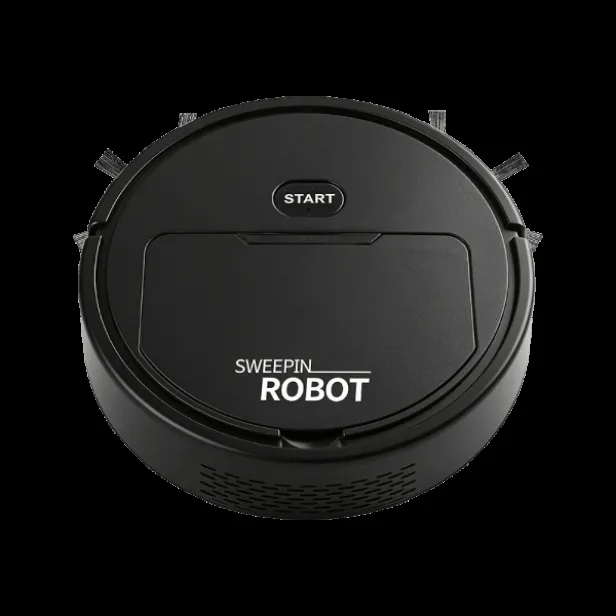
A robot vacuum that's easy to own
DustaPro one-button robot vacuum: no app, no WiFi, 2.8 in tall, quiet, USB charging. $69.99, or from $49.99 each in bundles, with a 30-day refund guarantee.
Check today's price →$69.99, or from $49.99 each in bundles
How do you fix common robot vacuum problems?
- Not picking up dirt: empty the bin, clean or replace the filter, remove hair from the main brush.
- Shorter runtime: clean the filter and brushes so the motor isn't straining; charge fully between runs; batteries slowly lose capacity with age.
- Gets stuck often: clear cords and small objects, raise or block very low furniture, clean the wheels and sensors.
- Stops near nothing, or acts like it's at a ledge: clean the cliff sensors underneath. Very dark rugs can also confuse cliff sensors on some robots.
- Spins in circles: a wheel may be jammed with hair, or a bump sensor is stuck. Clean both.
- Pushes debris around: the side brush may be bent or the main brush wrapped in hair.
- Smells bad: empty and wash the bin (if washable), replace the filter, and check for anything wet that was vacuumed up.
- Won't charge: wipe the charging contacts and the USB port gently with a dry cloth, and try another cable or adapter.
How do you take care of the battery?
Lithium-ion batteries last longest when they're used regularly and kept at room temperature. Run the robot often, recharge it after each run, and avoid leaving it fully drained for weeks. Don't store it in a hot car, a freezing garage or in direct sun. If you're going away for a long time, charge it partway and store it in a cool, dry place. Over a few years, any battery holds a little less charge; a clean filter and brushes reduce strain and help you get the most runtime from it.
How can you make your home easier on the robot?
A few small changes make the robot clean better and need less fixing. Do a 60-second pick-up before each run: chargers, socks, toys and pet toys off the floor. Bundle cords behind furniture with clips. Remove or tape down rugs with long fringe, which tangle brushes. Add furniture risers if a sofa is just low enough for the robot to get stuck under it. And place doormats at entrances so less sand and grit comes in, which protects both your floors and the robot's brushes. Our guide to robot vacuums in small apartments has more setup tips for tight spaces.
When should you replace a robot vacuum?
With regular care, a robot vacuum can last for several years. It may be time to replace it if the battery no longer runs long enough to clean your space even after brushes and filters are fresh, the motor sounds strained or makes grinding noises, the wheels or bumper are physically broken, or replacement parts are no longer available. For an inexpensive robot, replacing it can make more sense than repairing it. See whether cheap robot vacuums are worth it for how to think about cost over time.
Which maintenance mistakes should you avoid?
- Letting the bin overflow for several runs.
- Putting a wet filter back before it's completely dry.
- Using water or sprays on sensors and electronics.
- Pulling wrapped hair hard instead of cutting it, which can damage brush bearings.
- Vacuuming up liquids or wet spills with a dry robot.
- Ignoring strange noises, which often mean something is stuck in a brush or wheel.
The bottom line
A robot vacuum stays effective with a few minutes of care: empty the bin after every run, clear hair from the brushes and wheels weekly, tap out the filter and wipe the sensors, and replace filters and brushes when they wear. Simple robots without docks or mop systems are the easiest of all to look after.
Our pick for low-maintenance daily cleaning is DustaPro. Check today's DustaPro price.
Sources
- U.S. Environmental Protection Agency. What Is a HEPA Filter?
- U.S. Environmental Protection Agency. Introduction to Indoor Air Quality.
- Official DustaPro product page, checked October 2026.
Frequently asked questions
How often should you clean a robot vacuum?
Empty the bin after every run, clean the brushes, filter, sensors and wheels weekly, and replace filters every two to three months.
Why is my robot vacuum not picking up dirt?
Usually a full bin, a clogged filter or hair wrapped around the main brush. Empty, clean and untangle, then try again.
How do you clean robot vacuum sensors?
Wipe them gently with a dry microfiber cloth or cotton swab. Don't use water or sprays unless the manual says it's fine.
Can you wash a robot vacuum filter?
Only if the manual says it's washable. Rinse it, then let it dry completely, usually 24 hours, before putting it back.
How do I make my robot vacuum battery last longer?
Run it regularly, recharge after each run, keep it at room temperature and keep the filter and brushes clean so the motor doesn't strain.
Is DustaPro easy to maintain?
Yes. It's a one-button robot with no app or dock, so maintenance is just the bin, filter, brushes, wheels and sensors. $69.99, or from $49.99 each in bundles.

Michelle Hert
Michelle looks into the cleaning products that go viral in ads, from toilet foams to mini vacuums and drain cleaners. She reads the product pages, checkout and return policies, trusted safety sources and buyer feedback so you know what a product really does before you buy it. Her reviews are built on manufacturer information, official checkout and return policies, trusted safety sources and buyer feedback, and are updated when offers change. More about Michelle.