
- Keep brushes, wheels and filters clean so the motor doesn't work harder than needed.
- Run it on hard floors and low rugs; thick carpet drains batteries faster.
- Charge at room temperature; avoid hot or freezing spots.
- Use it regularly; lithium-ion batteries don't like sitting unused for months, fully drained.
- Store at partial charge if you won't use it for a while.
- Replace the battery when run time drops a lot, if the model allows it.
When a robot vacuum starts stopping before the room is done, most people assume it's broken. Usually, it isn't. Run time depends on what the robot is cleaning, how clean its brushes and filter are and how the battery has been treated. All rechargeable batteries slowly lose capacity with age, but a few simple habits can keep yours running strong for longer. This guide explains what affects robot vacuum battery life, how to charge and store it, why run time drops and what to do when it does.
What affects robot vacuum battery life?
| Factor | Effect on run time |
|---|---|
| Floor type | Hard floors use less power than carpet |
| Dirty brushes and wheels | Hair tangles make the motor work harder |
| Clogged filter | Reduces airflow; the motor strains |
| Room size and clutter | More obstacles mean more stops and turns |
| Temperature | Heat and cold reduce battery performance |
| Battery age | Capacity declines over hundreds of charge cycles |
How does DustaPro charge?
DustaPro is a one-button robot vacuum with no app or WiFi, about 2.8 in tall, rated up to 60 dB and charged by USB. Because it uses USB, you can charge it from a phone charger, a power strip or a laptop. Its suction is about 450 Pa, designed for daily maintenance of hard floors and low rugs, which also helps the battery: hard floors take less power than thick carpet. Read our DustaPro review.
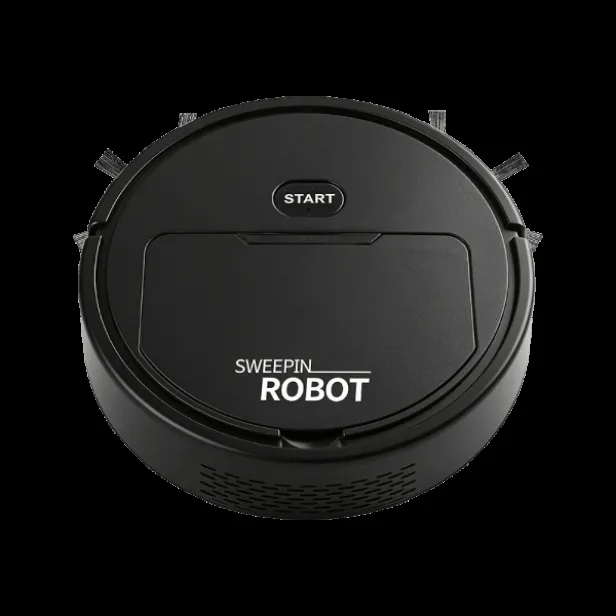
Simple daily cleaning with easy USB charging
DustaPro: one button, no app, no WiFi, about 2.8 in tall, up to 60 dB, USB charging. Built for daily upkeep of hard floors and low rugs. $69.99, or from $49.99 each in bundles.
Check today's price →$69.99, or from $49.99 each in bundles
How should you charge a robot vacuum?
- Charge fully before the first use, as the manual directs.
- Use the cable and charger type recommended by the manufacturer.
- Charge at room temperature, away from heaters and direct sun.
- Don't cover the robot while it charges.
- Recharge after each run so it's ready next time.
How do lithium-ion batteries age?
Most robot vacuums use lithium-ion batteries. They lose some capacity with each charge cycle and with age, faster when they're kept very hot, left fully drained for long periods or stored at full charge for months. Normal daily use with regular charging is fine; that's what they're designed for.
Why is my robot's run time getting shorter?
- Hair on the brushes and wheels. Clean them; this is the most common cause.
- A clogged filter. Tap it out or replace it.
- A full bin. Empty it every run or two.
- New rugs or carpet. Thicker surfaces use more power.
- Cold or hot storage. Move the robot to a room-temperature spot.
- An aging battery. If everything is clean and run time is still much shorter, the battery may need replacing.
How does maintenance help the battery?
A clean robot uses less energy. Hair wrapped around the brush adds friction; a clogged filter makes the motor pull harder; dirty wheels make it slip. Each of these drains the battery faster and can shorten its life over time. A few minutes of cleaning each week keeps run time up. See robot vacuum maintenance.
- Empty the bin after every run or two.
- Clean the main brush and side brush weekly.
- Pull hair from wheel axles.
- Tap out or rinse the filter as directed; dry fully before reinstalling.
- Wipe the sensors.
How can you make each charge cover more floor?
- Clear clutter so the robot doesn't waste time bumping and turning.
- Close doors to rooms you don't need cleaned today.
- Split big homes into zones; clean one area per run.
- Keep it to hard floors and low rugs.
See robot vacuum cleaning schedule.
How should you store it when not in use?
If you're going away or won't use the robot for weeks, charge it to around half, turn it off if it has a power switch and store it in a cool, dry place. Don't leave it fully drained for months, and check and top it up every few months. Battery makers commonly recommend partial charge for long storage of lithium-ion batteries.
Does temperature matter?
Yes. Lithium-ion batteries work best at room temperature. Heat speeds up aging, and cold temporarily reduces capacity. Don't charge or store the robot in a hot garage, near a radiator, in direct sunlight or in an unheated room in winter.
Are there battery safety tips?
- Use the charger and cable recommended by the manufacturer.
- Stop using a battery that's swollen, leaking, very hot or damaged.
- Don't charge on soft surfaces like beds or sofas.
- Recycle old lithium-ion batteries properly; don't put them in household trash.
The EPA explains how to handle and recycle used lithium-ion batteries safely.
Do pets drain the battery faster?
Pet hair wraps around brushes quickly, which increases drag. In homes with pets, clean the brush every few days to keep run time up. See robot vacuum for pet hair.
Why does carpet drain batteries?
Carpet creates more resistance for the wheels and brush, so the motor works harder. Low-suction robots designed for hard floors and low rugs aren't built for thick carpet. Keep robots to the surfaces they're designed for, and use a full-size vacuum on carpet. See robot vacuum for rugs.
Can getting stuck drain the battery?
Yes. A robot that keeps getting stuck and freeing itself burns energy without cleaning. Fix trap spots and clear cords. See robot vacuum getting stuck.
Does a strong battery matter for dust control?
A robot that finishes its run every day keeps floor dust and dander down, which matters for people with dust allergies. The ACAAI recommends reducing household dust for people with dust allergies. See how to reduce dust in the house.
Is a simple robot still worth it?
For daily upkeep of hard floors and low rugs, a simple robot that charges by USB is easy to live with: press the button, let it run, plug it in. See are cheap robot vacuums worth it? and robot vacuum without an app.
How much does DustaPro cost?
DustaPro is $69.99 for one, $59.99 each for two, $54.99 each for three and $49.99 each for four. Returns are accepted within 30 days for unused products in original packaging; defective items can be replaced or refunded.
What is a charge cycle?
A charge cycle is using the equivalent of a full battery's worth of energy, whether that's one full run from 100% to 0% or two half runs. Lithium-ion batteries are typically rated for hundreds of cycles before their capacity drops noticeably. Partial top-ups don't "waste" cycles, so plugging the robot in after every run is a healthy habit, not a harmful one. The old advice to fully drain batteries before charging applied to older battery types, not lithium-ion.
How long should a daily run take?
For a small apartment or one floor of a house with mostly hard floors, a daily maintenance run doesn't need to be long. The goal is to pick up the day's crumbs, dust and hair, not to deep clean. If the robot can't cover your whole floor on one charge, split the home into two zones and alternate days, or run it twice with a recharge in between. Most people find that daily runs in the main living areas, plus weekly runs in bedrooms, keep floors tidy.
What are signs the battery is wearing out?
- The robot runs much shorter than it used to, even when clean.
- It shuts off suddenly while showing charge left.
- It takes much longer to charge, or never reaches full.
- The battery area feels unusually hot.
- The battery case looks swollen; stop using it right away.
What about the warranty?
If run time drops sharply soon after you buy a robot, contact the seller. A battery that fails early can be a defect, and defective items can be replaced or refunded. Keep your order confirmation, and note when you first noticed the problem. For DustaPro, defective items are covered by replacement or refund, and unused items can be returned within 30 days in original packaging.
Does a second robot help?
In two-story homes, a second robot on the other floor means each one cleans a smaller area per charge, which keeps runs short and complete. It also saves carrying a robot up and down stairs. That's one reason the two-pack is a popular choice. See robot vacuum for a small apartment for single-floor setups.
Does the time of day matter?
Not for the battery itself, but running the robot when rooms are clear, such as after breakfast or while you're at work, means fewer obstacles and a more efficient run on each charge.
The bottom line
Keep the brushes, wheels and filter clean, charge and store at room temperature, use the robot regularly and keep it on hard floors and low rugs. When a clean robot's run time still drops a lot, the battery is likely aging.
For simple daily cleaning with USB charging, our pick is DustaPro. Check today's DustaPro price.
Sources
- U.S. Environmental Protection Agency. Used Lithium-Ion Batteries.
- American College of Allergy, Asthma and Immunology. Dust Allergies.
- Official DustaPro product page, checked October 2026.
Frequently asked questions
How long does a robot vacuum battery last?
It depends on the model and use; capacity slowly declines over hundreds of charge cycles.
Why is my robot vacuum's run time getting shorter?
Usually hair on brushes, a clogged filter or a full bin; sometimes an aging battery.
Should I leave my robot vacuum charging all the time?
Recharging after each run is fine; for long storage, keep it around half charged.
Does carpet drain a robot vacuum battery faster?
Yes, carpet adds resistance; hard floors and low rugs use less power.
How does DustaPro charge?
By USB, so you can use a standard charger.
How do I dispose of an old robot vacuum battery?
Recycle lithium-ion batteries properly; don't put them in household trash.

Michelle Hert
Michelle looks into the cleaning products that go viral in ads, from toilet foams to mini vacuums and drain cleaners. She reads the product pages, checkout and return policies, trusted safety sources and buyer feedback so you know what a product really does before you buy it. Her reviews are built on manufacturer information, official checkout and return policies, trusted safety sources and buyer feedback, and are updated when offers change. More about Michelle.